
WONDER OF THINKINGអច្ឆរិយនៃការគិត

Showing posts with label iphone. Show all posts

Friday, September 9, 2011

SKYFIRE SMARTEST MOBILE BROWSER


You can go to get it by this link
can browse internet faster speed and with full flash video support like Youtube, Metacafe,....

Flash Video
The “Video” icon enables users to play millions of Flash videos around the web that otherwise do not play on mobile. This unlocks content trapped behind those error messages with question marks and blue Legos by transcoding the Flash content into HTML5 on Skyfire’s servers.
User Agent Switching
Load web pages as either traditional Android user agent or as a desktop browser. The desktop option gives you more flexibility in accessing web sites and allows discovery of video content that might not be visible on the mobile site.
Facebook QuickView
Facebook quick view keeps your Facebook page loaded in the cloud for easy, one touch access to your news feed, profile, friends, inbox, events and places.
Fireplace Feed Reader
A simple but addictive tool that provides a filtered list of your Facebook feed that only includes links to browsable web pages, images, and videos posted by your Facebook friends.
Popular Pages
You just finished reading a story on one of your favorite web sites and want to quickly decide what to read next. Click on the Popular button on the Skybar and instantly see what content on the site is most popular within the 500+ million user Facebook community. Recommendations from friends are prioritized and show up at the top of the list.
Related Ideas
Explore ideas from a webpage, click "ideas" to analyze a page, pick a topic and explore search results for that new topic including results from Facebook, VideoSurf, Twitter and more.
Skyfire Search
Only enter your search term once and see search results from Google, Facebook, VideoSurf, Twitter and more.
Facebook Like Button
Puts the Facebook Like Button on every page of the Internet. No scrolling around searching for the button on the page, simply click on the Like Button to easily 'like' or 'unlike' the page you are viewing.

Thursday, September 8, 2011

iPhone 5: 20 most-wanted features (updated)


iPhone 5: 20 most-wanted features (updated)

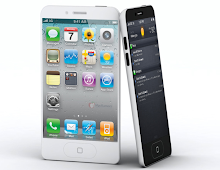
MacRumors commissioned this mock-up based on alleged iPhone 5 case schematics.
(Credit: MacRumors.com)

Editors' note: Updated on 09,09, 2011.

With just weeks to go before Apple unveils the next iPhone this fall, the iPhone 5 rumors continue to fly fast and furious. Will it have a completely new design with a larger screen or just be a slightly modified version of the iPhone 4 (the iPhone 4S) with enhanced parts and various tweaks? Will there be a smaller, lower-cost iPhone?

iPhone 5 cases suggest larger screen than 4 inch screen


iPhone 5 cases suggest larger screen than 4 inch screen

While we have heard a number of rumors about the Apple’s upcoming iPhone 5, a rumor that surfaced the web recently suggest that the iPhone 5 would come up with a 4-inch screen to take on Android phones.
The new case designs released by MacRumors suggest that iPhone 5 is expected to feature a bigger screen as compared to the iPhone 4’s 3.5-inch display. According to the measurements taken by the MacRumors’s designer team, the iPhone 5 design may have dimensions of 4.33” x 2.36”, suggesting a shorter but only slightly wider design. In comparison, the iPhone 4 dimensions are 4.5” x 2.31”.
However the tech site also mentioned that the actual third-party cases that are circulating around the web are significantly longer and wider than what the designs in the document have suggested.MacRumors’s team has ordered a third-party iPhone 5 case designs and performed a series of measurements on them. The team mentioned that the accurate measurements were difficult to achieve due to

Dictionary Universal v4.0 Productivity + Pronunciation Dictionaries for EN, DE, FR (Ipad)

Dictionary Universal v4.0 Productivity + Pronunciation Dictionaries for EN, DE, FR (Ipad) | 1.42 GB

Attracted a lot of positive feedback in AppStore. Works fast, multitasking, dictionaries can be cast via the Internet, Wi fi (from the local computer), and by dragging the dictionaries in itunes.

Navigon MN 7.7.5 Build 447 for Navigon 22x0, 23x0 (30.08.11) | 799 MB


Navigon MN 7.7.5 Build 447 for Navigon 22x0, 23x0 (30.08.11) | 799 MB


Upgrading to MN 7.7.5 Build 447 for Navigon 22x0, 23x0 (possibly the same updated 13x0, 12x0, 11x0). Tried in 1210.

Release Date: 2011
Version: MN 7.7.5 Build 447
Developer: NAVIGON
System Requirements: Navigon MobileNavigator SW 23x0, 22x0, 13x0, 12x0, 11x0

Iphone 3GS Jailbroken IOS 4.3.3 | 428.40 MB

Iphone 3GS Jailbroken IOS 4.3.3 | 428.40 MB


Iphone 3gs jailbroken ISPW ( jailbroken with snowbreeze ) file comes with Ireb to stop itunes nag and instructions to install on iphone.

Enjoy :-) Download - Filesonic 
http://www.filesonic.com/file/1800597824/JB.3GS.zip

Mirror:
Download -Fileserve 
http://www.fileserve.com/file/PtT6HvQ/JB.3GS.zip

Friday, August 26, 2011

iOS 5 Beta 6 Jailbroken Firmwares + Tutorial (No UDID Requirements) | 7.46 GB

This summary is not available. Please click here to view the post.

Apple iOS 5 Beta 6 (Iphone,Ipad,Ipod) | 6.09 GB

This summary is not available. Please click here to view the post.

iPhone Week 32 Pack | 1.64 GB

This summary is not available. Please click here to view the post.

Tuesday, July 26, 2011


People have been dreaming about video calling for decades. iPhone 4 makes it a reality. With the tap of a button, you can wave hello to your kids, share a smile from across the globe, or watch your best friend laugh at your stories — iPhone 4 to iPhone 4, iPad 2, the new iPod touch, or Mac over Wi-Fi. No other phone makes staying in touch this much fun.


One-tap simple.
FaceTime works right out of the box — no need to set up a special account or screen name. And using it is as easy as it gets. Let’s say you want to start a video call with your best friend. Just find her entry in your Contacts and tap the FaceTime button. Or maybe you’re already talking on a voice call with her, iPhone 4 to iPhone 4, and you want to switch to video. Just tap the FaceTime button on the screen. Either way, an invitation pops up on her screen asking if she wants to join you. When she accepts, the video call begins. It’s all perfectly seamless. And it works in both portrait and landscape modes.


Two cameras made for video calling.

iPhone 4 has two built-in cameras, one on the front above the display and one on the back next to the LED flash. The front camera has been tuned for FaceTime. It has just the right field of view and focal length to focus on your face at arm’s length. So it always presents you in the best possible light.


Share what you see with the back camera.
Imagine your sister is away at school and can’t make it to your son’s birthday. So you’re cheering her up with a FaceTime call. As the cupcakes come out, your son’s eyes light up, and you just have to share it. Tap a button, and before you can say, “Make a wish,” iPhone 4 switches to the back camera, and to the birthday boy's big moment. Another tap switches back to the front camera and to you. Simple, fast, and fun.


Friday, July 22, 2011

Everything You Need to Know


iPhone 4: Everything You Need to Know
The iPhone 4 is here and I have all the answers to your questions about Apple's new iPhone including pictures and detailed specifications.
Steve Jobs introduced the iPhone 4 today, which he claims offers over 100 new features, though he would focus on only a handful for the keynote. The iPhone 4 looks like the iPhone prototype obtained under questionable circumstances by Gizmodo: stainless steel casing, all-glass front, and a design Jobs describes as the thinnest smartphone on the planet: almost 25 percent thinner than the iPhone 3GS.. Unlike previous iPhones, the iPhone 4 will have volume controls on the side of the phone along with an accessible microSIM tray. The iPhone 4 features a front-facing camera, and the back sports a microphone, 30pin connector for docking, and a speaker, while the top sports a second microphone for noise cancellation, sleep/wake button, and a headset input.

Twitter Delicious Facebook Digg Stumbleupon Favorites More

 
Design by www.ebrings.blogspot.com | Bloggerized by Pech Phearun - Premium Blogger Themes | Pech Phearun
powered by Prmania